

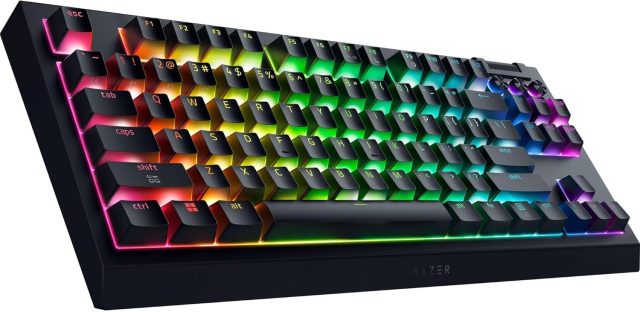
If you’re a fan of the tenkeyless layout, and enjoy having a bit more space on your desk to chuck your mouse around during a vigorous game of Apex Legends, you may have been interested in Razer giving the BlackWidow V4 the wireless treatment. The good news is we have one right here: the V4 Tenkeyless HyperSpeed. It’s an interesting beast, being both a high-end gaming peripheral and an enthusiast’s project board, and on the whole it hits the mark beautifully.
And a beast it most definitely is. The first thing you’ll notice straight out the box (well, after removing it from the lovely felt bag it’s packaged in) is the weight. Despite being a compact board without the numpad, it’s a chunky bit of kit. It feels incredibly solid and well-made thanks to the aluminium top plate, and the keys themselves feel top quality and sturdy. It doesn’t budge an inch, even when you have the rear feet out and things get frantic in a match, which will be good news to anyone whose left hand gets a bit heavy when the action ramps up.
The layout is refreshingly clear too. Razer has managed to cram in a multi-function roller and dedicated buttons for muting, battery checks, and media without making the board feel cluttered, or making them the centre of attention. Having that volume roller (which in itself is very nicely textured) right at your fingertips is one of those “once you have it, you can’t go back” features, and the battery check button is a nice way to admire just how long this things can run without needing a top-up.

Connectivity is where this earns its “HyperSpeed” name. You can use it wired via USB-C, or go wireless using Razer’s high-speed dongle. It’s plenty quick enough, boasting a 1,000Hz polling rate that offers speedy wireless responsiveness suitable to keep you competitive. If you’re not out to play high-end games you can turn on the power saving mode which slows things down a little to get a few more hours out of the battery, but if you’re looking for snappy inputs for gaming you’ll want every last ounce of speed you can squeeze out of this. Obviously for the most reliably quick speed, grab that USB cable and you’ll get the top speeds and get rid of your battery concerns.
As you’d expect if you know Razer kit already, the Synapse software is the brains of the operation. It gives you copious customisation options, and does that amazing thing of automatically hooking into games that support the software to give game-specific lighting. I’m still not entirely sure I’m getting the most out of Synapse (there’s a lot to learn) but it’s a very deep bit of software. The RGB lighting on this keyboard is fantastic though; it feels a bit more refined than other RGB keyboards. Out of the box, it seems softer and more subtle than previous generations, which I actually prefer for a cleaner desk look and a slightly classier feel. Don’t worry though, if you want to turn your room into a disco or make your desk look like the runway at Gatwick, you can still crank it up in Synapse and it’ll really shine.
Elsewhere Razer has clearly been listening to the keyboard community because both the keys and switches are fully swappable. This gives you absurd flexibility in terms of the feel and sound of your kit. If you don’t like the stock switches, you can just pull them out; Razer even includes a handy tool to remove the caps and switches in the box. Being able to mix it up to this degree is amazing, and while I’ll most likely stick to what’s already attached, the chance of turning this keyboard into your own Frankenstein’s monster by making it your own in such a way is a great win for those who like to tinker.
The typing experience is also improved by layers of sound-dampening foam, so for a gaming keyboard, it’s not overly loud. It’s still going to be a bit more audible than a quiet office keyboard, it’s not designed for absolute silence after all. The space bar, in particular, has a noticeable “clunk” to it compared to the rest of the keys which can be a little jolting at times. It’s not going to wake the neighbours, but you’ll certainly know when you’ve hit it and stands out from an otherwise nicely dampened set of keys.
Aside from the slightly awkward software and over-confident space bar, the only real sting is the price, sitting around the £150 mark. It’s a premium bit of kit though, and you’re definitely paying for that wireless freedom and the hot-swappable tech, but it’s going to be a bit of an investment. That said, if you’re looking to spruce your PC up a bit it’s an awful lot cheaper than an extra stick of RAM right now, so there’s that…
So should this be towards the top of your shopping list when you come to get hold of a new keyboard? Well despite the minimal gripes, if you want a tenkeyless board that feels like a solid professional tool rather than a plastic toy, or you value the ability to customise your switches later down the line, then absolutely. It’s solid, responsive, nicely quick at top speed, and between the fantastic construction and beautiful RGB implementation it really looks the part.

Leave a Reply